Read, Then Write: Forced Layout, Pointer Storms and the Spotlight
The web stage is an SVG the engine rewrites every frame. Day 3 finds three costs that no line of code looks guilty of: a layout read after a write, a pointer handler that ran four times per frame on fast screens, and a beautiful spotlight filter that was re-rasterised every frame.
The tool: where does a frame's time go?
web-trace.mjs records a DevTools timeline of the real stage under CPU throttling, during a real touch drag, and sums the time by event: script, style recalculation, layout, paint, layerize, commit, raster. Later in the course it grows two more lenses: --profile (JavaScript self-time by function) and --stacks (which line of code forced a style or layout).
The first trace of a low-end drag on the playground world spent 17.2 s of main-thread time on a 150-move drag. The CPU profile had one surprise at the top: renderFeel, a small function that positions contact shadows and word cards, with 1.6 s of self time in a 3 s drag.
Forced synchronous layout
A browser normally batches work: your JavaScript writes to the DOM, and after the frame's script has run, the browser recalculates styles and layout once. But if your script reads a layout value (clientWidth, getBoundingClientRect, getBBox) after writing, the browser must stop and compute layout right then, synchronously, so it can return a correct number. Do that in a loop or every frame and you pay for layout twice or more per frame.
renderFeel and the particle canvas each read the svg's size after the frame's transform writes: two forced layouts of a world svg with thousands of nodes, every frame. The fix is a discipline rather than a trick: measure once at the start of the frame, before any write, keep the numbers in a size object, and pass them down.
render(): void {
  // Read phase: every layout value this frame needs, before any write.
  this.box = this.captured !== undefined ? this.svg.getBoundingClientRect() : undefined;
  this.size = { w: this.svg.clientWidth, h: this.svg.clientHeight,
                view: this.host.clientWidth, left: this.host.scrollLeft };
  // Write phase: transforms, shadows, cards, particles all use this.size.
  ...
}
Pointer events between frames reuse the box measured at the frame start, so a burst of touch events does not trigger a layout each either.
Pointer storms on fast screens
Phones and tablets at 120 Hz, and pens at 240 Hz, deliver two to four pointer events per frame. The engine's pointerMove did everything on each one: every actor updated where its eyes were looking (gaze), and the whole cast was scanned for a drop target under the dragged object (hover). The engine bench showed it plainly: a drag frame cost 0.89 ms at 120 Hz and 1.42 ms at 240 Hz, for the same visible result.
The fix coalesces: pointerMove records the latest point; flushPointer(), called once at the top of tick(), does gaze and hover once per frame. Frame cost became flat regardless of input rate.
The spotlight, rasterised every frame
While a child drags an object, everything else gently fades towards a pale wash, so the held object stands out. On the web this was one SVG colour filter per dimmed object. Filters are rasterised offscreen, and because the cast animates, every frame. A trace with the spotlight disabled (--no-focus) showed it at about a fifth of the drag's paint and layerize time.
The spotlight is part of the design, so it stays. What changed is when: an adaptive quality governor watches the clock's frame time. On sustained slow frames (over 0.75 s) it steps the quality level down: level 1 drops the per-object filters (the backdrop still washes, so the effect stays readable); level 2 runs idle objects' wobble at half rate. After 3 s of fast frames it steps back up. A fast device never sees a difference.
Before and after side by side
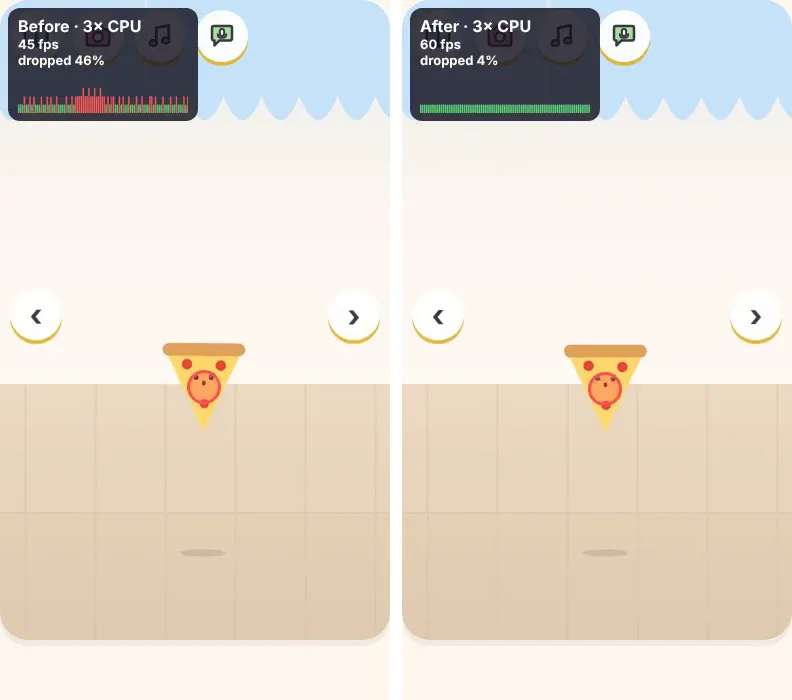
Mid-range class (3× CPU), the market world. Before, the drag dips to 45 fps with 46 % dropped frames; after, it holds 60 fps with 4 % dropped.
Low-end (6× CPU), median of three runs, same machine, after Days 2 and 3 together:
| world | scenario | dropped before → after | input → frame p95 before → after |
|---|---|---|---|
| playground | drag-slow | 99.2 % → 70.1 % | 240.9 → 117.5 ms |
| playground | drag-240hz | 97.6 % → 41.7 % | 200.3 → 106.5 ms |
| playground | drag-hold | 98.9 % → 40.4 % | 183.7 → 78.7 ms |
| playground | tap-spam | 95.8 % → 46.0 % | 163.9 → 92.4 ms |
| market | idle | 100 % → 3.7 % | – |
| market | drag-hold | 99.6 % → 21.3 % | 183.4 → 63.5 ms |
The main-thread total for the 150-move drag went from 17.2 s to 10.9 s: script 5.7 → 3.8 s, paint 3.5 → 2.3 s, commit 2.7 → 1.8 s.
Design principles at work
- Command/query separation in time. A frame has a read phase and a write phase; mixing them is what forces layout. Structuring
render()as "measure, then mutate" makes the rule visible in the code. - The engine owns input semantics; the view owns the DOM. Coalescing pointer moves lives in the controller (
StageController.flushPointer), so the web view and the native view both benefit without knowing about it. - Policy separated from mechanism. The governor decides how much to draw from a measured signal (frame time); the renderer only asks "what quality level am I at?". Changing the thresholds never touches drawing code.
Key takeaways
- Never read layout after writing in the same frame. Read everything first.
- On high-refresh screens, input arrives faster than frames: do per-frame work once per frame.
- Expensive visual effects can degrade gracefully under measured load instead of being removed.
- A profile's top entry is often a small function paying for someone else's write.