Draw It Yourself: a Canvas Stage with the Native Renderer
After Day 8, the moving objects were about half of every low-end frame's paint: as SVG, the browser re-records and re-rasterises every visible object's parts each frame. Day 9 draws them on one canvas with the renderer the native app already ships, keeps every accessibility and testing contract, and decides with data where the canvas should run.
The idea: reuse the native renderer
The native app draws the stage with SkiaStageRenderer. Day 2 noted that it depends on Skia only through a narrow structural interface: a canvas with save, translate, rotate, scale, drawPath, drawOval…, and a factory for paints, colours and paths. The app injects React Native Skia; the benchmark injects CanvasKit.
A browser's 2D canvas can implement that same interface. So instead of writing a second renderer, the web gets an adapter, and the exact drawing code that ships on phones draws the web's moving layers.
The adapter, and its one expensive call
The first version of the adapter mapped each call one to one, including save() and restore(), which the renderer calls around every object, part and repeated copy. A profile put ctx.save at the top: a 2D context saves its entire state each time. The adapter keeps its own transform stack in JavaScript and sets the context's transform once per draw, only when it changed. Paint state (colour, alpha, line width) is likewise set only when it changes, because canvas setters parse strings. Primitives trace the context's current path instead of allocating a Path2D per circle.
What stays SVG
The canvas draws the cast, contact shadows, hover rings, door badges, weather, spotlight wash, particles, stars and fun overlays. Everything else keeps working exactly as before:
- the static world stays in Day 8's underlay SVG, which is never repainted;
- word, quest and game cards stay SVG (they are text);
- every object keeps its SVG root: label, keyboard focus, tap pad and state attributes (position, expression, each part's scale and visibility). Screen readers, hosts and tests read them unchanged; keyboard focus now outlines the pad.
Hit testing by replay
With the drawing on a canvas, the DOM can no longer say which part of which object is under a finger. The answer is to replay the same drawing as a hit test: a second adapter whose draw calls ask isPointInPath / isPointInStroke instead of painting, while the renderer reports which actor and part each call belongs to. Actors are tested front to back in the DOM's own order: an object's painted parts first, then its tap pad (exactly the pad the SVG would have used).
Two bugs from building it are instructive:
- The replay started each actor from the previous actor's transform. The adapter took its base transform from the context, which still held the last part of the previous actor. Only the first object near a tap was tested correctly; the pad fallback had hidden it.
- A part nested differently from the SVG. Parts are drawn in z order. On the web, a part listed before its parent is drawn as a top-level part behind it: the ostrich's tuft sits behind its head. The shared renderer nested it on top. The web canvas now nests parts exactly as the SVG does; native was left unchanged and flagged for review.
Proving it looks and behaves the same
Two checks run on one frozen frame drawn both ways, because two separately loaded pages are never in the same animation pose:
| check | result |
|---|---|
| pixels (3 worlds × 3 scroll positions) | at most 0.6 % of pixels differ by more than 24/255, all on anti-aliased edges |
| taps (6 worlds, an 8 px grid over the view) | same object at least 99.95 % of the time, same part at least 99.67 % |
| end-to-end suite (108 tests, both renderers) | identical results |



Where should the canvas run?
On the cloud VM, which composites in software, canvas mode cut paint by about 65 %, but each canvas frame costs a copy on the main thread (Day 7's EXP-030 lesson), so idle got worse. Chromium can run its GPU path on SwiftShader, a CPU implementation of the GPU API. On that path, the one a phone's browser uses, the difference was large:
| GPU path, low + mid, 24 cells × 2 runs | SVG | canvas |
|---|---|---|
| dropped-frame sum | 4 335 | 1 894 (−56 %) |
| input p95 sum | 9 580 ms | 6 233 ms (−35 %) |
| low playground drag-hold, dropped | 99.7 / 99.9 % | 15 / 20 % |
Because the GPU here is emulated on the same CPU, the size of that win is probably overstated; the direction agrees with the software-path paint numbers. The default became auto: the canvas where the browser composites on a real GPU (a WebGL context without a major performance caveat that is not a software renderer), SVG otherwise, and SVG wherever there is no 2D canvas at all.
Before and after side by side
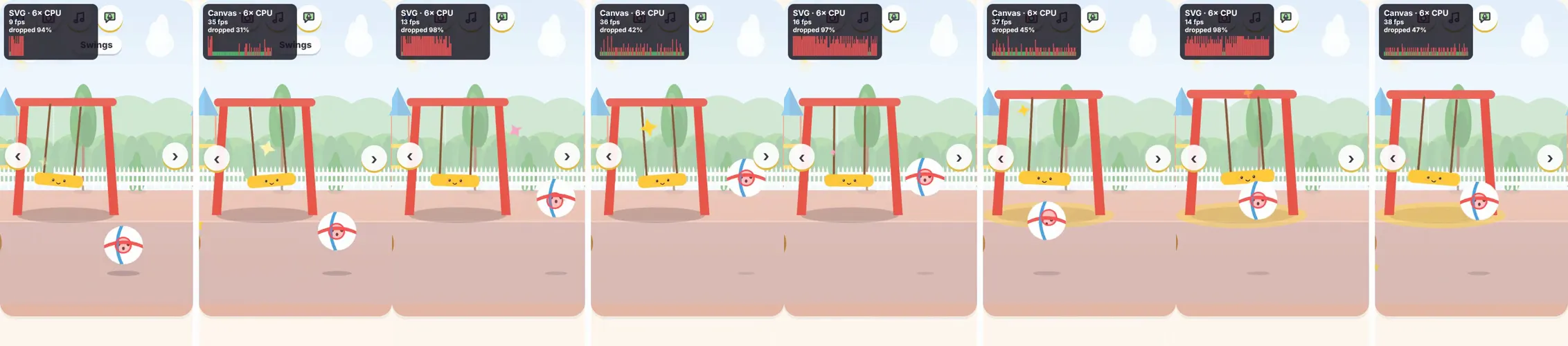
The same build on the GPU path, 6× CPU: SVG (left) at 9–16 fps, canvas (right) at 35–38 fps.
Design principles at work
- Adapter pattern and dependency injection. One renderer, three injected backends. The web gained a renderer by implementing an interface, not by forking drawing code.
- MVC with two views of one model.
StageControlleris the model and controller; the SVG view and the canvas view are interchangeable views of it, chosen at construction (renderer: 'svg' | 'canvas' | 'auto'). - Keep the contract. Labels, focus, tap pads and state attributes stay in the DOM, so accessibility, hosts and the test suite did not need to know the drawing moved.
- Decide by environment, measured.
autoencodes what the measurements showed: the same change is a win with GPU compositing and a loss without it.
Key takeaways
- Before writing a new renderer, check whether an existing one depends on an interface you can implement.
- Hit testing can be the drawing replayed; test front to back in the order users already experience.
- Prove parity on one frozen frame drawn both ways; separate page loads are never the same moment.
- When an optimisation depends on hardware, ship a policy that measures it (
auto), not a guess.