Measure Before You Touch
A performance lab on a real product: Dunyati, a kids' world-building game that runs as a React Native app (Skia) and in the browser (SVG). Day 1 builds the instrument before touching any code: device classes, frame budgets, and a suite anyone can rerun.
The complaint
The report was short: "Frames drop and lag, especially when dragging and dropping. We have to deliver the best performance on low- and high-end devices, in every interaction."
Dunyati is a stage of code-drawn objects (a fridge with a door that opens, a ball, a bus, an ostrich) that children drag, tap, throw and swipe. A market world holds around 90 objects and roughly 29 000 pieces of scenery across a wide, scrolling world. On a fast laptop it felt fine. On a cheap phone, a dragged apple lagged behind the finger and the whole world stuttered.
The temptation at this point is to open the code and start fixing what looks slow. This course does the opposite, every day: no change without a measurement before it and a measurement after it, on the same machine, in the same session. Over three days that rule produced 35 recorded experiments: 28 kept, 5 rejected, and 2 that measured something worth knowing without a code change. Today is about the instrument that made those numbers trustworthy.
A frame is a budget
A screen refreshes about 60 times a second, so every frame has 16.7 ms to do everything: handle the finger, move the physics, update the drawing, paint, and hand the result to the compositor. Spend 20 ms and that frame is dropped: the previous image stays on screen for two refreshes, and the child sees a stutter.
Two numbers describe what a child feels:
| metric | what it means | why it matters |
|---|---|---|
| dropped frames % | share of refreshes that missed their 16.7 ms deadline | smoothness: anything above a few percent looks janky |
| input → frame p95 | time from a touch event to the next painted frame, at the 95th percentile | responsiveness: the dragged object trailing the finger |
Averages hide the problem. A drag that is smooth 90 % of the time and stalls for 200 ms once a second feels broken, so the suite reports p95 and the share of dropped frames, never a mean frame time.
Device classes without a device lab
Nobody in this lab had a drawer of phones. What it did have was Chromium's DevTools protocol, which can throttle the CPU of a page by a factor. The suite defines three device classes:
| class | CPU throttle | viewport | stands in for |
|---|---|---|---|
| low-end | 6× | 360 × 740, touch | a budget Android phone |
| mid-range | 3× | 412 phone, touch | a typical phone |
| high-end | 1.5× | 1280 desktop, mouse | a laptop |
Throttling is an approximation, and the course says so every time it matters: it slows the main thread, not the GPU. A cloud VM with no GPU also composites in software, which makes some costs look larger than on a phone. Day 9 shows exactly where that distinction changed a decision. The defence is the second rule: compare builds only within one run, interleaved, at least twice.
The suite: rails and edge cases
The suite (npm run perf) measures the same interactions on every layer that can be slow:
| rail | what it measures |
|---|---|
| engine | one frame of physics and input handling, in Node |
| Skia recording | the native renderer drawing one frame into a picture (CanvasKit, headless) |
| web | the real demo stage in Chromium with CPU throttling and real touch input |
| native React | a guard test: a frame must cause zero React re-renders |
| parity | the optimised renderer must draw the same pixels as the simple one |
Each rail runs the same 13 interaction edge cases, named after what a child does: idle, drag-slow, drag-fast, drag-120hz, drag-240hz (several pointer events per frame, as on high-refresh screens), drag-hold, throw-spam, drag-with-taps, drag-scroll, drag-edge-scroll, tap-spam, swipe-nudge (a background swipe that sets the whole cast bouncing) and drop-chain.
npm run perf                 # everything, low/mid/high, gated against budgets
npm run perf:quick           # 3 worlds, low-end only, 1 rep
node scripts/perf/web-bench.mjs --dist <other build> ...   # A/B another build
node scripts/perf/web-trace.mjs drag market 6              # where a frame's time goes
node scripts/perf/record-ab.mjs --before A --after B       # side-by-side recording
Every web run also records memory (JS heap, DOM nodes, layout objects after a forced GC) and world open time. Budgets live in budgets.json and every rail ratchets against a recorded baseline, so a regression fails the run instead of waiting for a complaint.
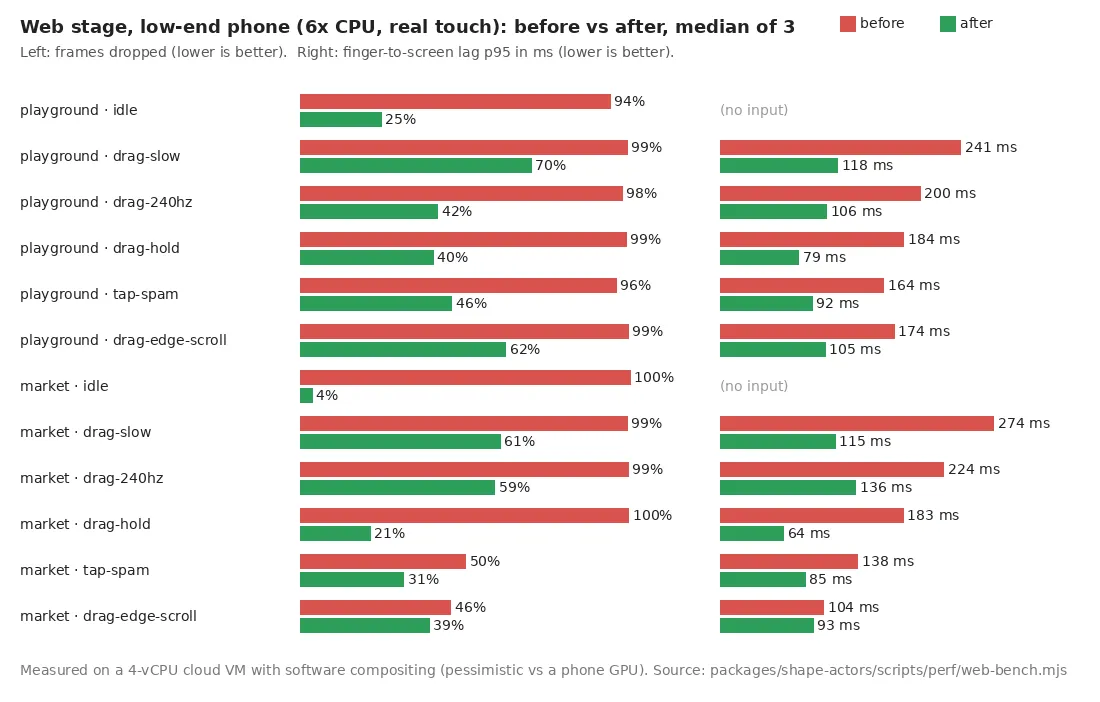
The chart is the first A/B the suite produced: twelve low-end cells, before and after the first round of fixes (Days 2 and 3). It is the shape every later decision takes: two builds, the same cells, the same session.
Recording what a child sees
Numbers convince engineers; a recording convinces everyone. record-ab.mjs drives the same real-touch script (slow carry, hold, fast zigzag, tap spam, background swipes) on two builds under the same CPU throttle, burns a live HUD into the video (fps, percentage dropped, and a sparkline where every red bar is a dropped frame) plus a red circle for the finger, and stitches the two side by side. Every day in this course shows one.
Design principles at work
The suite is small, but it follows the same design rules as the product code:
- Single responsibility. One script per question:
web-benchmeasures,web-traceexplains where time goes,record-abrecords,run.mjsgates. None of them does another's job. - Inversion of control. The engine takes its clock as a dependency (
RafClockin the browser,ManualClockin tests and benchmarks), so the same physics code runs frame-exact in Node and live in Chromium. - Shared scenarios. The 13 edge cases are defined once and mirrored by name in every rail. "drag-hold on market" means the same finger path in the engine bench, the Skia bench and the browser.
Key takeaways
- A frame is a 16.7 ms budget; report dropped % and p95 input latency, not averages.
- CPU throttling gives you device classes without a device lab; say plainly what it does not model (the GPU).
- Compare builds within one run, interleaved, at least twice. A machine's absolute numbers drift.
- Build the instrument first: rails, edge cases, budgets, a baseline, and a recording.